Smart TV apps for IPTV and OTT operators: shipping across every screen as one product
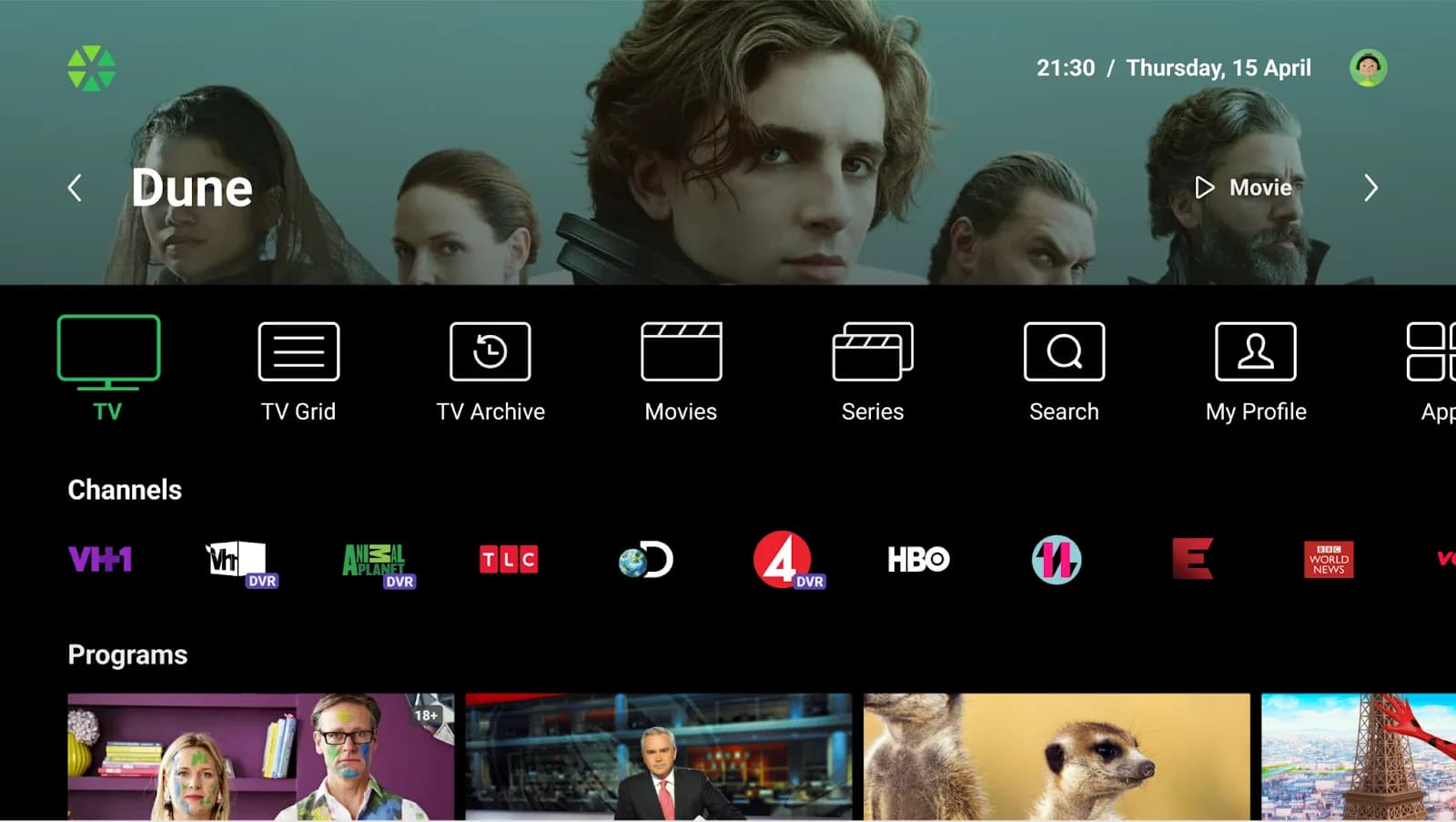
Smart TV is the consolidating screen of streaming. A subscriber who picked your operator a year ago for the IPTV set-top box is, by 2026, just as likely to watch through the Samsung TV in the living room, the LG TV in the bedroom, the Fire TV stick in the kitchen, and the Apple TV in the office. The question for operators isn't whether to ship native Smart TV apps — that decision was made for them by their subscribers. The question is how to ship across every relevant platform, keep them in sync, get each one through a different store, satisfy a different DRM stack, and have the whole thing feel like one product.
This is what SmartTUBE Apps were built for. This guide walks through what shipping at that breadth actually involves — by platform, by certification path, by DRM, and by delivery cost — and how the same architecture supports operators running stock SmartTUBE UI alongside operators who needed something deeply customised.
Why Smart TV apps moved from nice-to-have to table stakes
Two trends collided. First, Smart TV penetration in the markets where most Smartlabs operators run their services has crossed 80–90%. Almost every household replacing a TV in the last five years brought a Smart TV home, and most of those subscribers expect their operator's service available natively on it — without a dedicated set-top box. Second, premium content licensors increasingly require hardware-rooted DRM on every device class the operator delivers to. The combination means Smart TV native apps are no longer an extension of an IPTV service — they are part of the core delivery surface that operators are evaluated on by both subscribers and content rights holders.
The complication is that Smart TV is not one platform. It's at least six, each with its own SDK, certification queue, store policies, DRM implementation, remote-control idiom, and performance envelope. Some platforms have an eight-year-old version still actively used by subscribers; some get a major update every twelve months. Building for all of them as if they were one is what most operators try, until they realise it's a multi-year integration project of its own.
Smart TV platforms SmartTUBE Apps support
SmartTUBE Apps ship as native, store-published applications on the platforms below. Every one of them shares the same backend integration, the same content rails, the same continue-watching state, and the same operator branding — so adding a platform extends reach without forking the product or splitting the subscriber experience.
Samsung Tizen
Samsung Smart TVs from 2016 onwards are supported, distributed exclusively through the Samsung App Store and subject to Samsung's certification process on each release. Samsung is the largest single Smart TV installed base in most European markets, and its DRM coverage on recent model years is the broadest of any TV platform — which makes it the first target for most operators and the most flexible one for mixed content portfolios. Earlier model years can be supported on request; see the note on older models below.
LG webOS
LG webOS 4.0 and later (LG TVs from 2018 onwards) are officially supported, distributed through the LG Content Store. LG is the second-largest Smart TV platform worldwide and, like Samsung, carries broad DRM coverage on recent model years. Earlier webOS versions and pre-webOS LG TVs running NetCast can be supported on request, with longer lead times and a different certification model.
Android TV
Android TV is the broadest Smart TV platform globally. SmartTUBE Apps run on Android TV 9.0 and later, on devices that meet Google's Compatibility Definition Document — which includes TVs from TCL, Sony, Philips, Sharp, and dozens of others, plus retail streaming devices. Distribution is via Google Play. Android TV also reaches hardware-backed DRM on properly certified devices, which is what most premium content requires.
Android TV is the foundation for Android TV Operator Tier (ATV OT) — a Google-certified mode where the operator's app runs as the system launcher, replacing the default home screen with the operator's own. That path gets its own section below.
Amazon Fire TV
Fire TV is supported through native SmartTUBE Apps distributed via the Amazon Appstore. Fire TV has its own store, its own certification process, its own store policies, and its own remote-control idiom, so it is a separate delivery track from Android TV even where the two look similar from the outside. Fire TV adoption has grown substantially in markets where Amazon retail is well established, and it is an effective way to reach subscribers who add a service to a TV they aren't replacing.
Apple TV (tvOS)
Apple TV apps are distributed through the Apple App Store and use Apple's FairPlay DRM. tvOS has a smaller installed base than Android TV or Samsung Tizen, but a disproportionate share of premium-content viewers — particularly in North America and Western Europe.
Hisense VIDAA
Hisense's VIDAA operating system runs on Hisense Smart TVs and on TVs from a growing number of partner brands. VIDAA adoption has accelerated as Hisense has grown into one of the largest global TV manufacturers, and it is strongest in the affordable-TV segment that often serves second and third sets in the household — which is exactly where operators lose reach if they only cover the premium brands.
Older models and other platforms
Every TV platform has a support floor, and it exists for physical reasons: older sets have limited memory and CPU headroom and older platform runtimes, which constrain what an app can do on them. Support below the official floor is delivered as a scoped exercise with a reduced feature envelope rather than as a standard build — worth doing when an operator has a material installed base on those models, and worth knowing about before it becomes a launch surprise. Ports to additional Smart TV platforms, including legacy systems such as Samsung Orsay, Panasonic, and Vewd-based TVs, are handled the same way: case-by-case, not off the shelf.
DRM — what actually gates the content you can carry
Smart TV apps are only as useful as the content they're licensed to play. Premium content — studio output, major sports rights, European pay-TV libraries — almost always requires hardware-rooted DRM, and the requirement is written into the licence, not the app.
Smart TV DRM splits along one line that matters. Apple devices speak FairPlay; everything else speaks Widevine, PlayReady, or both. Beyond that split, which DRM a given TV supports — and at which security level — depends on the manufacturer and the model year, not on the app. So the practical question for an operator is not "which DRM does my app support" but "what security level does the TV in the subscriber's living room report, and does my content licence permit playback at that level?"
That question has teeth. Older Smart TVs commonly report software-level security only, which under most studio licences caps playback resolution or blocks the title outright. Recent model years reach hardware-backed levels — Widevine L1, PlayReady SL3000 — which is what premium 4K licensing generally demands. An operator carrying premium content needs two things as a result: a DRM system that enforces security-level policy at licence issuance, and a catalogue policy that degrades or filters gracefully instead of failing at playback.
Behind the scenes, the SmartTUBE platform handles this with Universal DRM (UDRM) — a single product that issues Widevine, PlayReady, and FairPlay licences from one infrastructure, with security-level enforcement at issuance. Content is encrypted once using Common Encryption, with on-the-fly cenc-to-cbcs re-encryption for FairPlay clients. The operator manages one DRM relationship and one encryption pipeline; the app on each platform receives the right licence for the right scheme automatically.
The delivery-cost change that catches operators out
This one rarely makes it into a platform evaluation, and it should. On a managed IPTV network, linear TV to set-top boxes runs over multicast: one stream per channel on the network regardless of how many subscribers are watching it. Smart TV apps don't do multicast. They pull unicast adaptive-bitrate streams, which means every concurrent viewer is a separate stream all the way from the origin or edge.
The consequence is that shifting viewing from STBs to Smart TV apps is not a neutral migration — it converts a fixed network cost into a variable one that scales with concurrency. An operator moving a meaningful share of its linear audience onto Smart TV apps needs peak egress headroom sized for the cup final, not for the average evening. That is a CDN and origin capacity decision, and it should be made at the same time as the app decision rather than discovered in the first big live event.
Two things make it manageable: an operator CDN sized against real concurrency rather than average load, and a delivery architecture that can absorb a spike without re-architecting. Our CDN strategy guide covers the four models and their economics in detail, and SmartMEDIA is the component that handles packaging, encryption, and delivery for the Smart TV surface.
What SmartTUBE Apps deliver on Smart TV
Functional capability is consistent across all Smart TV platforms. The framework absorbs the platform differences; the operator's subscribers see the same product on every TV.
Content discovery and navigation
- Home screen with a configurable top banner (regular, faded gradient, or auto-play trailer), main menu, and content rails — all curated by the operator via the SmartTUBE backend, no app release required to change them.
- Content rails: TV channels with current-programme posters; manually-curated operator rails; auto-recommended personalised rails powered by the SmartTUBE Recommender; Top-10 most-watched; Continue Watching; Favourites; Personal Recordings; Reminders; Purchased content. Custom rails can be filtered by any content or account attribute — "1980s French comedies", "Modern Bollywood", "Jackie Chan action films" — without engineering work.
- Unified search across TV programmes, movies, series, and optional external sources, with real-time results as the user types. Multilingual keyboards. Voice search on platforms with native voice input, or via Bluetooth remote controls with built-in microphones.
- EPG in classic grid format with horizontal-timeline preview and theme-based filtering by genre.
Playback
- Adaptive bitrate streaming (HLS and MPEG-DASH) with automatic quality switching, manual quality override, and resume from last position.
- Live TV with DVR controls — pause, rewind, fast-forward — even on linear channels. Restart-from-beginning for in-progress programmes.
- Skip intro and skip credits with timed auto-skip. Next-episode autoplay for series with configurable delay.
- Multi-audio tracks with language selection per stream. Subtitle support across DVB, SSA/ASS, SRT, WebVTT, CEA-608/708, SMPTE-TT, and Teletext, with operator-defined language priorities and user override.
- Multiple bookmarks per title for users who watch in chunks across days or sessions.
- VAST integration for AVOD content with ad-marker detection and enforced no-seek rules during ad playback — operators monetising free or ad-supported tiers don't need a separate ad-insertion solution.
Profiles and personalisation
- Multiple user profiles per subscriber account with synchronised preferences across devices. The master profile manages other profiles.
- PIN-protected profile switching, individual channel sorting, content restriction settings, separate watch history and favourites.
- Kids profile mode with maximum age levels for TV and VoD content, downtime-window scheduling, and daily viewing-time limits.
Cross-device behaviour
- Continue watching syncs across all devices — TV, mobile, web, set-top box. Pause on the living-room TV, pick up on the phone, finish on the bedroom Smart TV. Position state lives in the SmartTUBE backend, not on the device.
- Casting and screen-sharing: Chromecast from mobile to Google Cast-enabled TVs; AirPlay 2 from iOS to compatible TVs; Smartlabs proprietary handoff between SmartTUBE Apps.
- Operator messages delivered as text + image notifications, urgent full-screen messages, or watermark overlays — useful for service announcements, billing reminders, or promotional campaigns reaching subscribers on the device they're actively watching.
Android TV Operator Tier (ATV OT) — the deepest customisation path
For operators who want their app to be the experience on the TV — not one icon among many on a default home screen — Android TV Operator Tier is the answer. ATV OT is Google's certified mode in which the operator's application becomes the system launcher: the device boots straight into the operator's UI, the operator manages the channel grid, the operator decides what apps are available and how they're surfaced. Google retains specific UX requirements that have to be met to keep certification — but within those, the operator's experience is the experience.
Smartlabs is a Google partner and one of a small number of vendors with delivered, Google-certified ATV OT launchers running in production — including on third-party operator hardware, not only on set-top boxes we designed ourselves. That distinction matters if you have already chosen your device vendor.
The reference project for the scale this path can reach: the world's first migration of bespoke Linux set-top boxes to Android TV Operator Tier, delivered in 2022 for a tier-one Central European operator and reported publicly at the time — more than 400,000 devices moved in place, software-only, with no truck-roll programme and no service interruption. More than 300,000 of those boxes are still in service on the certified launcher today.
ATV OT certification has structural requirements that take time and engineering specialisation to satisfy. Operators considering this path generally choose between two routes: launch with a SmartTUBE-built ATV OT launcher as a packaged product, or commission a customised variant through Smartlabs Custom Development. Tier-one operators usually take the second route, because their device fleet, content rights, and UX requirements rarely fit a generic template.
Custom development — when off-the-shelf isn't the answer
Roughly half of Smartlabs operator deployments run essentially stock SmartTUBE Apps with operator branding, colours, and content configuration. The other half need something deeper — bespoke UX flows, integration with non-standard back-office systems, custom features that map to a market-specific business model, or a fully-rebuilt UI that doesn't look like SmartTUBE at all.
Smartlabs Custom Development covers both routes. The engineering team works as project-based delivery, dedicated team, or staff augmentation embedded in the operator's own organisation — the choice depends on the operator's internal capacity and how the relationship is structured.
What gets customised
- UI/UX redesign — fully bespoke interfaces designed for the operator's brand and subscriber expectations. The underlying SmartTUBE backend stays the same; the app shell, navigation patterns, content presentation, and motion design are rebuilt.
- Feature development — new capabilities that don't exist in the standard product, ranging from market-specific monetisation flows to integrations with non-streaming operator services.
- Integration with operator systems — billing platforms (Stripe, PayPal, regional processors, mobile-carrier billing), CRM and customer-data platforms, OSS/BSS systems, enterprise SSO (SAML, OAuth), MAM/DAM systems, marketing-automation tools.
- API extensions and webhooks — additional APIs on top of the SmartTUBE base, for automation flows that operators need to build into their own product or partner ecosystems.
- White-label operator tools — custom CMS interfaces, analytics dashboards, subscriber-management portals, content-scheduling systems, all built on the SmartTUBE platform.
How a custom Smart TV project actually runs
Six phases. Discovery — requirements gathering and technical assessment, usually 2–4 weeks. Planning — architecture design, project roadmap, certification path mapped against each target platform. Development — iterative sprints, two-week cadence, demos to the operator each sprint, with the SmartTUBE backend stable underneath while the apps evolve. Testing — comprehensive QA, user acceptance testing, certification-readiness validation on each Smart TV platform. Deployment — staged rollout, monitoring, gradual expansion across the device fleet. Support — ongoing maintenance and enhancements through the operator's chosen support tier.
Typical custom Smart TV project duration: 6–12 months end-to-end, depending on how many platforms are in scope and how deep the customisation goes. A full-stack rebuild across every supported Smart TV platform, with custom backend integrations and bespoke UI, sits at the longer end. A stock SmartTUBE Apps deployment with brand customisation and operator-configured content rails ships in 8–12 weeks.
How operators use SmartTUBE Apps on Smart TV
Different operators draw the line in different places between standard and customised. Four patterns, drawn from production deployments.
Stock apps with operator branding. The most common shape, and the one most regional and mid-sized operators should start from. Branding, colour, typography, and content configuration are deployment settings, not code — so the operator gets a current-generation Smart TV app set without a development project attached to it.
Multi-tenant wholesale. A regional operator runs its own service as one tenant and hosts TV services for neighbouring ISPs as additional tenants on the same headend, each with its own subscriber base, catalogue, and branding. The apps are the same product per tenant; the multi-tenancy lives in the backend. It turns a small operator into a wholesale platform provider without a second deployment.
TV-as-a-Service across legacy and modern devices. A national incumbent whose combined networks reach close to every household in its market runs Smart TV apps alongside a retained legacy STB fleet — integrated through the SmartTUBE Ultra Browser Application, with no device swap — plus modern Android STBs for new installations, mobile, and web. The full UI ships in three languages as part of the standard customisation framework, not as a bespoke localisation engagement.
Smart TV expansion inside a platform upgrade. An established pay-TV operator adds two new Smart TV platforms in a single upgrade cycle to reach households it was missing, alongside a refreshed UX and VAST-based ad insertion. This is the most common growth pattern we see now: the first two platforms are a project, the next two are a release.
Named case studies for these deployments are collected in the Smartlabs case studies library.
App certification — the operational reality
Every Smart TV platform requires the operator's app to pass a store certification process before public release. Each store has its own review timeline, content policy, and technical-compliance checklist. The practical implication is the one that surprises operators most: updating an app across every Smart TV platform is not a single deploy. It's parallel certification queues with overlapping but non-identical requirements, and the slowest queue sets the date on which a feature is actually live everywhere.
Smartlabs supports operators through every store it publishes to: Samsung App Store, LG Content Store, Google Play, Amazon Appstore, Apple App Store, and Hisense's VIDAA store. Publishing services include app submission preparation, certification guidance, DRM integration validation, performance testing on multiple device models and OS versions, and ongoing maintenance for published applications. For operators new to multi-platform publishing, the certification-coordination work is usually as much of the project as the development itself.
Frequently asked questions
Can SmartTUBE Apps be customised per operator?
Yes, on every dimension. The standard product is fully white-label — operator logo, colour scheme, typography, menu structure, content categorisation, and feature toggles are configured per deployment without code changes. Beyond that, custom UI/UX, bespoke feature development, and full app shell rebuilds are available through Smartlabs Custom Development.
Which Smart TV platforms does SmartTUBE support?
Samsung Tizen (2016 onwards), LG webOS (4.0+, 2018 onwards), Android TV (9.0+), Amazon Fire TV, Apple TV, and Hisense VIDAA. Earlier model years and additional platforms are supported on request as scoped projects.
What about DRM?
Smart TV DRM depends on the TV's manufacturer and model year, not on the app. Apple devices use FairPlay; other platforms use Widevine, PlayReady, or both. SmartTUBE issues all three from Universal DRM with security-level enforcement at licence issuance, so premium content plays where the device and the licence allow it and is filtered or downgraded where they don't.
How long does it take to launch on a new Smart TV platform?
For a stock SmartTUBE Apps deployment with operator branding and standard content configuration, 8–12 weeks from project start to certified launch. For deeper customisation — bespoke UI, custom feature development, multiple platforms in parallel — 6–12 months. Certification queue times vary by platform and add variance independent of development progress.
Can SmartTUBE Apps replace the Android TV launcher?
Yes — through Android TV Operator Tier (ATV OT), the SmartTUBE App becomes the system launcher and replaces the default home screen. The operator controls the boot experience, the channel grid, and the app surface. Smartlabs has delivered Google-certified ATV OT launchers in production, including on third-party operator hardware, and delivered the world's first in-place migration of bespoke Linux STBs to ATV OT in 2022.
Do Smart TV apps change my delivery costs?
Yes, and it's worth modelling before launch. Smart TV apps use unicast adaptive-bitrate streaming rather than multicast, so peak egress scales with concurrent viewers instead of with channel count. Operators moving a significant share of linear viewing onto Smart TV apps should size CDN and origin capacity against peak concurrency — see our CDN strategy guide.
How are operator messages delivered to Smart TV apps?
SmartTUBE supports two delivery methods for the same message content. Push notifications use OS-native methods on platforms that support them. Internal SmartTUBE messaging delivers messages within the app, including text, images, urgent full-screen messages, and watermark overlays during playback. Both methods are configured per operator and can be scheduled or broadcast in real time.
Are Smart TV apps the same as STB apps?
Same product, same backend, same user experience — published to a different store with a different certification process and tuned to a different remote control. The SmartTUBE Apps framework presents one consistent service across STBs, Smart TVs, mobile, and web, with continue-watching state, content rails, and user profiles synchronised across all of them.
Conclusion
Smart TV is no longer a screen operators can treat as optional or defer to a later release. Subscribers expect the service natively on the TV they bought, and content rights holders expect hardware-rooted DRM on every device they watch it on. Meeting both means shipping across six platforms — each with its own SDK, store, certification queue, and DRM behaviour — planning for the delivery-cost shift that comes with unicast, and making the result behave like one coherent product.
The SmartTUBE Apps framework exists precisely so operators don't carry that integration project themselves: native builds on Samsung Tizen, LG webOS, Android TV, Fire TV, Apple TV, and Hisense VIDAA, sharing one backend, one content model, and one continue-watching state — running stock for operators who want speed, or fully customised through Custom Development for operators who need depth, all the way to a Google-certified Android TV Operator Tier launcher.
If you're evaluating how to ship Smart TV native apps across multiple platforms — or you've already shipped one or two and the rest are sitting in the backlog — we'd be happy to walk through what your specific platform mix would involve. The full SmartTUBE Apps documentation covers the technical detail.